12.2. Database correlations
A database correlation is a map that relates one or more different time-varying databases so that when accessed with a common timestate, the database correlation can tell VisIt which timestate to use for any of the databases in the database correlation. VisIt supports multiple logical time sliders, so timestates can be changed independently for different time-varying databases in the same window. No time slider for any database can have any effect on another database. Sometimes when comparing two different, but related, time-varying databases, it is useful to make plots of both databases and see how they behave over time. Since changing time for each database independently would be tedious, VisIt provides database correlations to simplify visualizing multiple time-varying databases.
12.2.1. Database correlations and time sliders
When you open a database for the first time, VisIt creates a trivial database correlation for that single database and creates a new logical time slider for it. Each database correlation has its own logical time slider. Figure 12.4 shows a database correlation as the active time slider.
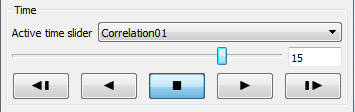
Fig. 12.4 Database correlation as the active time slider
Suppose you have plots from time-varying database A and database B in the same visualization window. You can use the logical time slider for database A to change database A’s timestate and you can use the logical time slider for database B to change database B’s timestate. If you want to change the timestate for both databases at the same time using a single logical time slider, you can create a database correlation involving database A and database B and then change timestates using the database correlation’s logical time slider. When you change timestates using a database correlation’s time slider, the timestate used in each plot is calculated by using the database correlation’s time slider’s timestate to look up the plot’s expected timestate in the database correlation. Thus changing timestates using a database correlation also updates the logical time slider for each database involved in the database correlation.
12.2.2. Types of database correlations
A database correlation is a map that relates one or more databases. When there is more than one database involved in a database correlation, the timestates from each database are related using a correlation method. Database correlations currently have 4 supported correlation methods: padded index, stretched index, time, and cycle. This section describes each of the correlation methods and when you might want to use each method.
For illustration purposes, the examples describing each correlation method use two databases, though database correlations can have any number of databases. The examples refer to the databases as: database A and database B. Both databases consist of a rectilinear grid with a material variable. The material variable is used to identify the database using a large letter A or B and also to visually indicate progress through the databases’ numbers of timestates by sweeping out a red material like a clock in reverse. At the first timestate, there is no red material but as time progresses, the read material increases and finally totally replaces the material that was blue. Database A has 10 timestates and database B has 20 timestates. The tables below list the cycles and times for each time state in each database so the time and cycle behavior of database A and database B will make more sense later when time database correlations and cycle database correlations are covered.
Timestate |
0 |
1 |
2 |
3 |
4 |
5 |
6 |
7 |
8 |
9 |
Times |
14 |
14.5 |
15 |
15.5 |
16 |
16.5 |
17 |
17.5 |
18 |
18.5 |
Cycles |
0 |
1 |
2 |
3 |
4 |
5 |
6 |
7 |
8 |
9 |
Timestate |
0 |
1 |
2 |
3 |
4 |
5 |
6 |
7 |
8 |
9 |
Times |
16 |
17 |
18 |
19 |
20 |
21 |
22 |
23 |
24 |
25 |
Cycles |
10 |
11 |
12 |
13 |
14 |
15 |
16 |
17 |
18 |
19 |
Timestate |
10 |
11 |
12 |
13 |
14 |
15 |
16 |
17 |
18 |
19 |
Times |
26 |
27 |
28 |
29 |
30 |
31 |
32 |
33 |
34 |
35 |
Cycles |
20 |
21 |
22 |
23 |
24 |
25 |
26 |
27 |
28 |
29 |
12.2.2.1. Padded index database correlation
A padded index database correlation, like any other database correlation, involves multiple input databases where each database potentially has a different number of timestates. A padded index database correlation has as many timestates as the input database with the largest number of time states. All other input databases that have fewer timestates than the longest database have their last timestate repeated until they have the same number of timestates as the input database with the largest number of timestates. Using the example databases A and B, since B has 20 timestates and A only has 10 timestates, database A will have its last timestate repeated 10 times to make up the difference in time states between A and B. Note how database A’s last timestate is repeated in Figure 12.5.

Fig. 12.5 Padded index database correlation of A and B (every 5th timestate)
12.2.2.2. Stretched index database correlation
A stretched index database correlation, like any other database correlation, involves multiple input databases where each database potentially has a different number of timestates. Like a padded index database correlation, a stretched index database correlation also has as many timestates as the input database with the largest number of timestates. The difference between the two correlation methods is in how the input databases are mapped to a larger number of timestates. The padded index database correlation method simply repeated the last frame of the input databases that needed more timestates to be made even with the length of the database correlation. Stretched index database correlations on the other hand do not repeat only the last frame; they repeat frames throughout the middle timestates until shorter input databases have the same number of timestates as the database correlation. The effect of repeating timestates throughout the middle is to evenly spread out the timestates over a larger number of timestates.
Stretched index database correlations are useful for comparing related related simulation databases where one simulation wrote out data at 2x, 3x, 4x, … the frequency of another simulation. Stretched index database correlations repeat the data for smaller databases, which makes it easier to compare the databases. Figure 12.6 shows example databases A and B related using a stretched index database correlation. Note how the plots for both databases, even though the databases contain a different number of timestates, remain roughly in sync.

Fig. 12.6 Stretched index database correlation of A and B (every 5th timestate)
12.2.2.3. Time database correlation
A time index database correlation, like any other database correlation, involves multiple input databases where each database potentially has a different number of timestates. The number of timestates in a time database correlation is not directly related to the number of timestates in each input database. The number of timestates in the database correlation are instead determined by counting the number of unique time values for every timestate in every input database. The times from each input database are arranged on a number line and each unique time value is counted as one timestate. Time values from different input databases that happen to have the same time value are counted as a single time state. Once the time values have been arranged on the number line and counted, VisIt calculates a list of timestate indices for each database that identify the right timestate to use for each database with respect to the time database correlation’s timestate. The first timestate for each database is always the first timestate index stored for a database. The first timestate is used until the time exceeds the first time on the number line, and so on.
Time database correlations are useful in many of the same situations as stretched index database correlations since they are both used to align different databases in time. Unlike a stretched index database correlation, the time database correlation does a better job of aligning unrelated databases in actual simulation time rather than just spreading out the timestates until each input database has an equal number. Use a time database correlation when you are correlating two or more databases that were generated with different dump frequencies or databases that were generated by totally different simulation codes. Figure 12.7 shows the behavior of databases A and B when using a time database correlation.

Fig. 12.7 Time database correlation of A and B (every 5th timestate)
12.2.2.4. Cycle database correlation
Cycle database correlations operate in exactly the same way as time database correlations except that they correlate using the cycles from each input database instead of using times. Figure 12.7 shows the behavior of databases A and B when using a cycle database correlation.

Fig. 12.8 Cycle database correlation of A and B (every 5th timestate)
12.2.3. Managing database correlations
If you want to create a new database correlation or edit properties related to database correlations, you can use the Database Correlation Window. You can open the Database Correlation Window, shown in Figure 12.9, by clicking on the Database correlations option in the Main Window’s Controls menu. The Database Correlation Window contains the list of database correlations, along with controls that allow you to create new database correlations, edit existing database correlations, delete database correlations, or set global settings that tell VisIt when to automatically create database correlations.
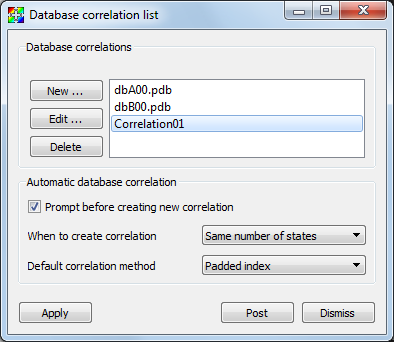
Fig. 12.9 Database Correlation Window
12.2.3.1. Creating a new database correlation
If you want to create a new database correlation to relate time-varying databases that you have opened, you can do so by opening the Database Correlation Window. The Database Correlation Window contains a list of trivial database correlations for the time-varying databases that you have opened. You can create a new, database correlation by clicking on the New button to the left of the list of database correlations. Clicking the New button opens a Database Correlation Properties Window (Figure 12.10) that you can use to edit properties for the database correlation.
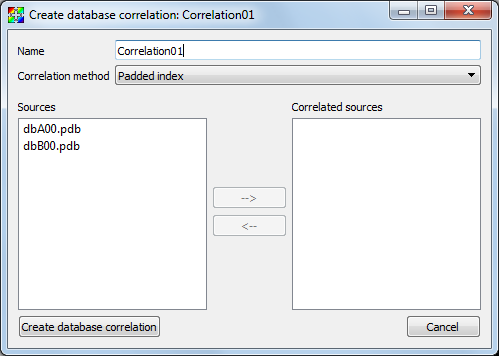
Fig. 12.10 Database Correlation Properties Window
New database correlations are automatically named when you first create them but you can change the name of the database correlation to something more memorable by entering a new name into the Name text field. Once you have entered a name, you should set the correlation method that the database correlation will use to relate the timestates from all of the input databases. The available choices, shown in Figure 12.11, are: padded index, stretched index, time, and cycle.
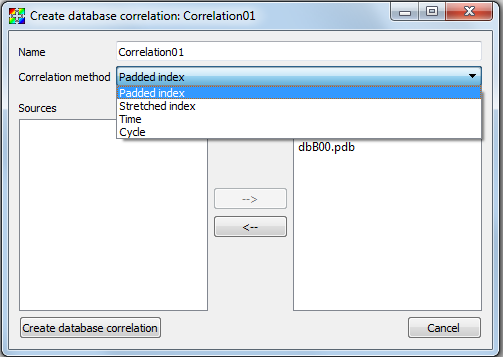
Fig. 12.11 Correlation methods
Once you have chosen a correlation method, it is time to choose the input databases for the correlation. The input databases, or sources as they are sometimes called in VisIt, are listed in the Sources list (see Figure 12.12). The Sources list only contains the databases that you have opened so far. If you do not see a database that you would like to have in the database correlation, you can either click the Cancel button to cancel creating the new database correlation or you can continue creating the database correlation and then add the other database to the correlation later after you have opened it. To add databases to the new database correlation, click on the them in the Sources list to highlight then and then click on the Right arrow button to move the highlighted databases into the database correlation’s Correlated sources list. If you want to remove a database from the Correlated sources list, highlight the database in the Correlated sources list and then click the Left arrow button to move it back to the Sources list. Once you are satisfied with the new database correlation, click the Create database correlation button to create a new database correlation.
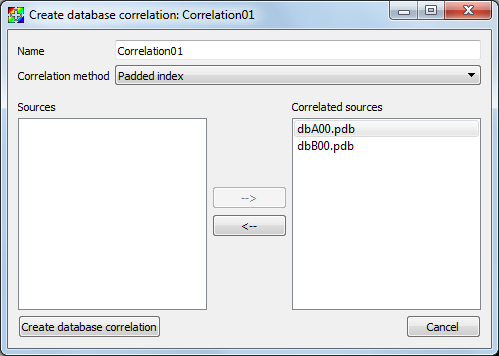
Fig. 12.12 Sources list and Correlated sources list
When you create a new database correlation, VisIt also creates a new time slider for the new database correlation. The database correlation’s active timestate is initially set to the first timestate, which might not match the timestate of individual plots in the vis window. Once you change time states using the Time slider, the plots in the vis window will be updated using the correct timestate with respect to the correlation’s active timestate. As always, if you want to update the timestate for only one database, you can select a different time slider using the Active time slider combo box and then change timestates using the Time slider. Any timestate changes made to an individual database that is also an input database for a database correlation has no effect on the database correlations that involve the changed database. Time state changes for a database correlation can only happen if you have selected the database correlation as your active time slider.
12.2.3.2. Altering an existing database correlation
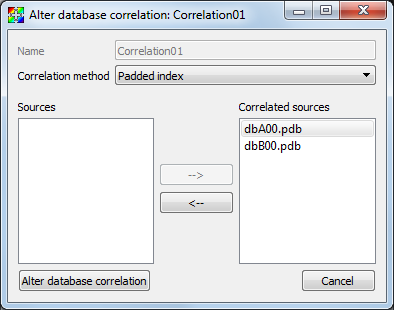
Fig. 12.13 Altering a database correlation
Once a database correlation has been created, you can alter it at any time by highlighting it in the Correlation list in the Database Correlation Window and clicking the Edit button to the left of the Correlation list. Clicking the Edit button opens the Database Correlation Properties Window and allows you to change the correlation method and the input databases. Once the desired changes are made, clicking the Alter database correlation button will make the specified database correlation use the new options and all plots in all vis windows that are subject to the changed database correlation will update to the new timestates prescribed by the altered database correlation.
Using the Database Correlation Properties Window explicitly alters a database correlation. Reopening a file or refreshing the file list can implicitly alter a database correlation if after reopening the affected databases, there are different numbers of timestates in the databases. When reopened databases that are input databases to database correlations have a new number of timestates, VisIt recalculates the indices used to access the input databases via the time slider and updates any plots that were affected. In addition to the timestate indices changing, the number of timestates in the database correlation and its time slider can also change.
12.2.3.3. Deleting a database correlation
Database correlations are automatically deleted when you close a database that you are not using anymore provided that the closed database is not an input database to any database correlation except for that database’s trivial database correlation. You can delete non-trivial database correlations that you have created by highlighting a database correlation in the Correlation list in the Database Correlation Window and clicking the Delete button to the left of the Correlation list. When you delete a database correlation, the new active time slider will be set to the active database’s time slider if the active database has more than one timestate. Otherwise, the new active time slider, if any, will be set to the time slider for the first source that has more than one timestate.
12.2.3.4. Automatic database correlation
VisIt can automatically create database correlations when they are needed if you enable certain global settings to control the creation of database correlations. By default, VisIt will prompt you when it wants to create a database correlation. VisIt can automatically create a database correlation when you add a plot of a multiple time-varying database to a vis window that already contains a plot from a different time-varying database. VisIt first looks for the most suitable existing database correlation and if the one it picks must be modified to accommodate a new input database or if an entirely new database correlation must be created, VisIt will prompt you using a Correlation question dialog (Figure 12.14). If you prevent VisIt from creating a database correlation or altering the most suitable correlation, you will no longer be prompted to create a database correlation for the list of databases listed in the Correlation question dialog.
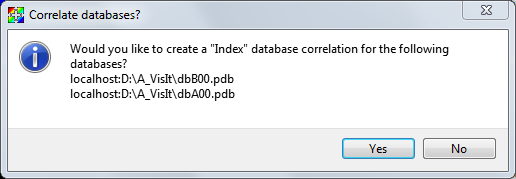
Fig. 12.14 Correlation question dialog
By default, VisIt will only attempt to create a database correlation for you if the new plot’s database has the same number of timestates as the existing plot. You can change when VisIt creates a database correlation for you by selecting a different option from the When to create correlation combo box in the Database Correlation Window. The available options are: Always, Never, and Same number of states. You can change the default correlation method by selecting a new option from the Default correlation method combo box. Finally, you can prevent VisIt from prompting you when it needs to create a database correlation if you turn off the Prompt before creating new correlation check box.